Giving Agent Evaluations an Error Budget

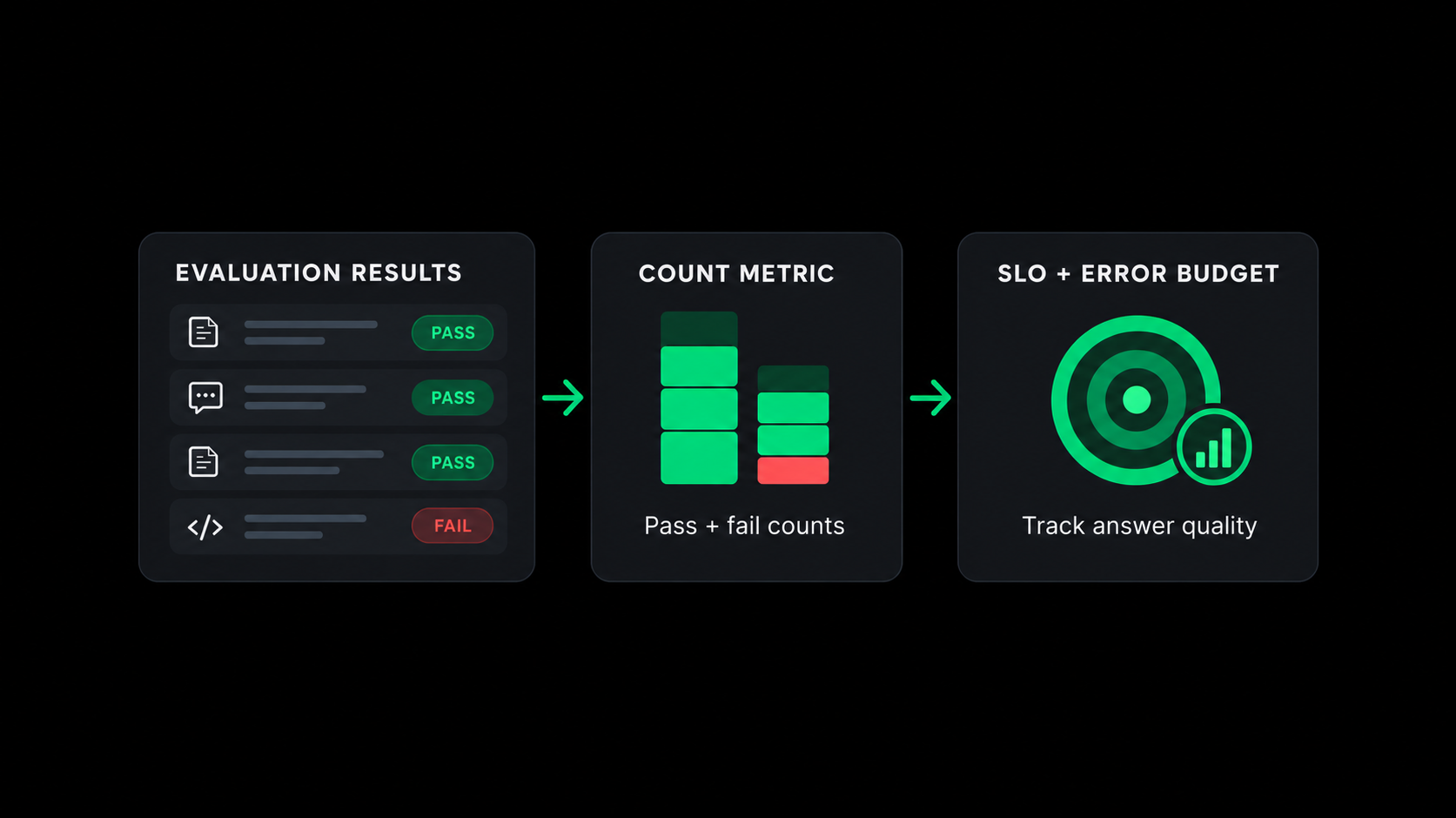
One of the hardest things to know about an agent in production is whether it's actually giving people correct answers. Every operational signal can be green while it tells a customer their refund window is 60 days when the policy says 30. Latency, error rate and token counts only describe whether the agent ran. Checking the answer itself takes an evaluation, where a judge (another model, or your own code) reads the response and marks it pass or fail. Datadog's Agent Observability records each request as a trace, runs those judges against it, and shows the results as a pass rate.
We'd like to handle that pass rate the way we already handle request errors. Set a target, treat the remainder as an error budget, and alert when it burns faster than it should. At a 95% target you're deciding that one unsupported answer in twenty is acceptable, and the budget tells you how many more you can absorb before someone has to stop and look. That's an ordinary SLO with an unusual indicator, and Datadog has had metric SLOs for years. So it was kind of a surprise to find out you can't build one directly on an evaluation.
The obvious objection is that Datadog already shows you the pass rate. Fair. Publish an evaluation and the Evaluations tab renders its pass rate with no work on your part. Take nobsquiz, an internal NoBS app with a custom LLM-as-a-judge evaluation called NoBSQuiz-Hallucination-Eval that grades every answer for groundedness. With the Traces explorer set to the past 30 days, the retained results show 25 answers marked as unsupported claims and 4 as grounded, a 13.8% pass rate. For a lot of teams that's as far as the number goes.
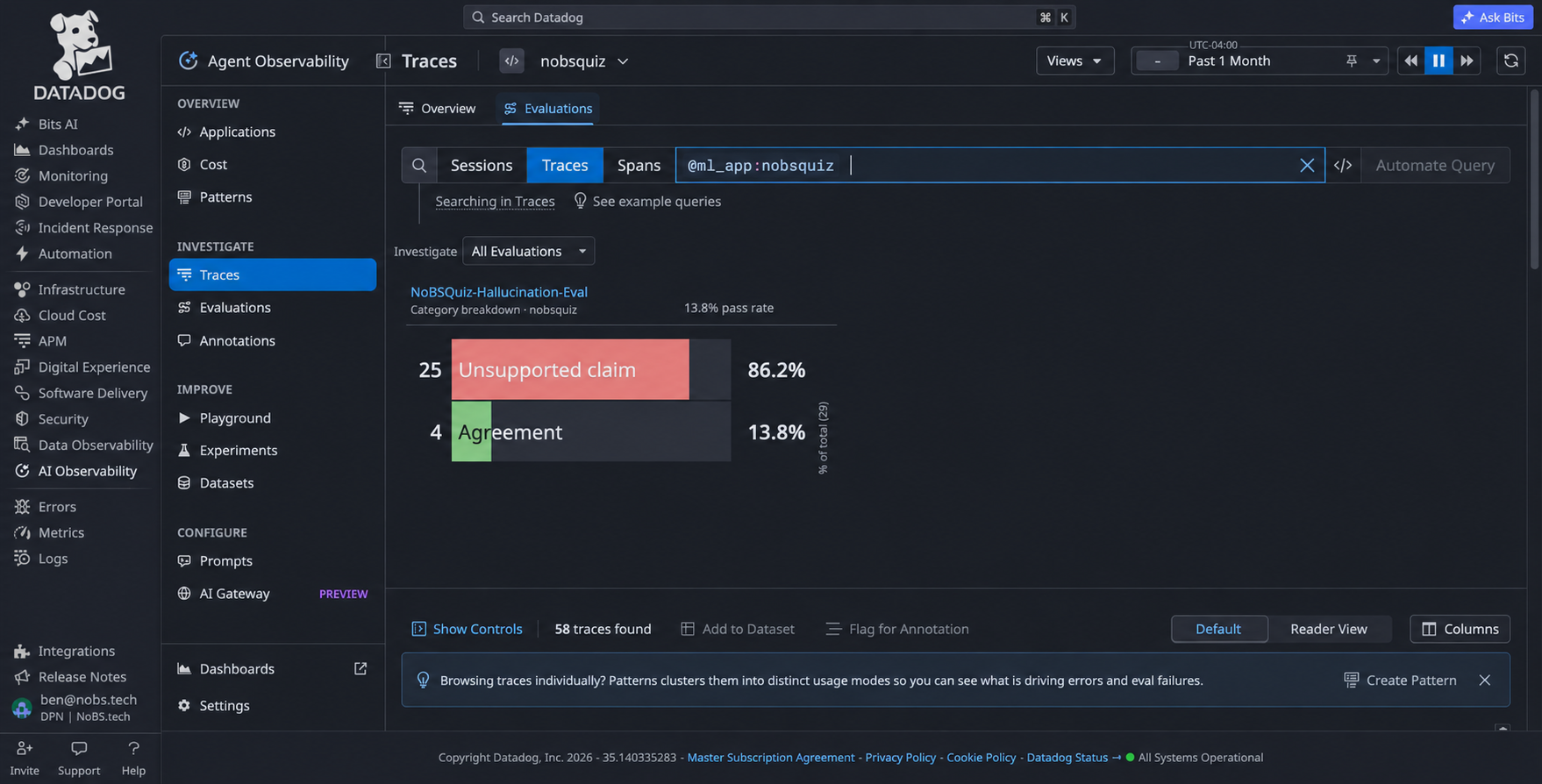
The Evaluations tab for nobsquiz: a 13.8% pass rate, with 25 unsupported claims and 4 grounded responses.
Why the pass rate needs a metric
That pass rate is computed from the spans in those traces, though. Datadog's docs are explicit that evaluation scores "follow Agent Observability trace and experiment retention rather than Datadog metric retention," and that retention is 15 days by default. A budget measured over 30 days outlives its own evidence, and that past-30-days view only ever shows what's still retained. In this snapshot, the newest nobsquiz evaluation was from September 22. With the default 15-day retention, the last of those spans expired around October 7, with the older ones going first.
It also isn't a metric. Agent Observability's own metrics (the ml_obs.* namespace) cover tokens, latency and errors, and none of them carry an evaluation outcome. A metric SLO needs a COUNT, RATE or DISTRIBUTION metric to divide. A monitor SLO divides time in a good state by total time, which is the wrong denominator for something you spend per answer. The newer Analysis monitor can alert on evaluations, but it isn't a monitor type an SLO will accept.
So we make the number a metric ourselves, with a scheduled workflow in Datadog's Workflow Automation. It counts pass and fail over a time range and submits them as one COUNT metric with a pass series and a fail series. Datadog keeps that for 15 months, and a normal metric SLO divides pass by pass plus fail. Workflow Automation has a native action that runs DDSQL (Datadog's SQL dialect) against evaluation results, so the adapter is a workflow with three steps and no code outside it.
Pointed at that same nobsquiz evaluation, the SLO reads 13.7% against a 95% target with an error budget of -1624%. That was a one-time run over the retained results, so all 29 results carry the run's timestamp and the SLO reproduces the ratio without the timing. The SLO shows that as 23.5 answers over budget, or roughly sixteen budgets in the hole (I'm aware budgets don't stack like that). The tab and the SLO are both reading 4 of 29, which is 13.79% displayed to one decimal in two different ways. The difference is that the SLO version can be spent, and the metric behind it will remain queryable for up to 15 months.
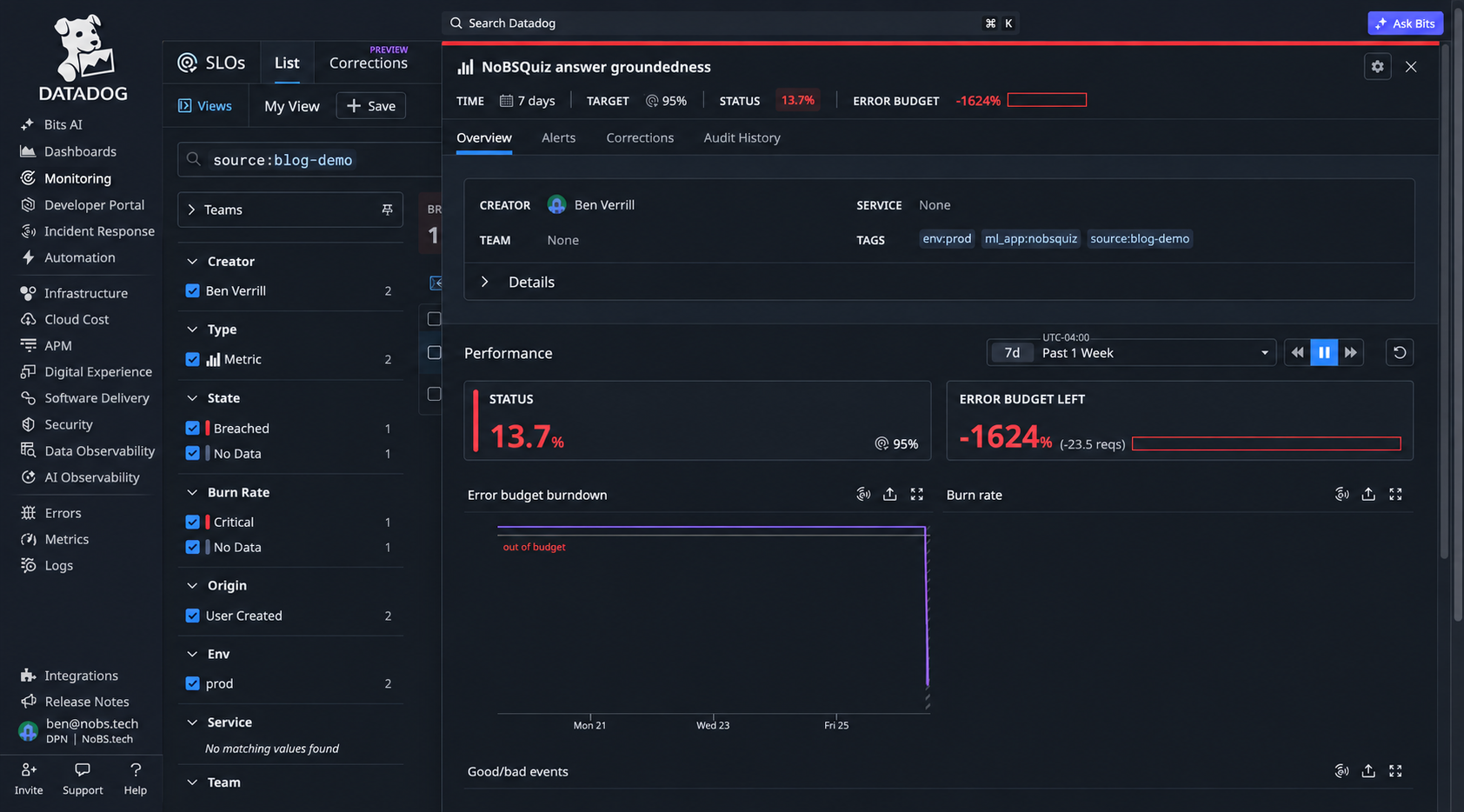
The metric SLO on the same evaluation: 13.7% against a 95% target, error budget at -1624%
Build the evaluation-to-metric workflow
Before building it you need to be instrumented with Agent Observability (the left nav calls it AI Observability), with at least one evaluation published and its Assessment Criteria mapping the output to pass or fail. You also need to know the evaluation's sampling rate. At 10% the SLI describes that sampled tenth of your traffic. Its denominator is evaluated answers, so it says nothing about requests the judge wasn't shown. And Workflow Automation needs a Datadog connection, since two of the three steps use one.
Query evaluation results with DDSQL
If your evaluator runs in your own code, skip the workflow and emit the count over DogStatsD where you already call the SDK's submit_evaluation. The workflow is for the judges that run inside Datadog, though, where there's no code path of yours to hook to. For those, the first thing we need is the query. Add a com.datadoghq.dd.ddsql.tableQuery action bound to that connection. The query below groups the last hour of evaluation results by label and assessment and returns one count per group:
SELECT label, assessment, ml_app, count(*) AS n
FROM dd.llm_observability(
  columns => ARRAY['@label','@assessment','@ml_app'],
  event_type => 'evaluation',
  filter => '@ml_app:nobsquiz',
  from_timestamp => now() - interval '1 hour',
  to_timestamp => now()
) AS t(label VARCHAR, assessment VARCHAR, ml_app VARCHAR)
GROUP BY label, assessment, ml_app
A few of those details tripped me up. The AS t(...) column list is required, and leaving it off fails with a clear error. On event_type => 'evaluation' the columns are @label and @assessment, and the @evaluation.<name>.assessment syntax from the Traces explorer returns zero rows with no error. A misspelled column in the columns list comes back as NULL with no error, and count(*) still counts every row, so the transform gets a group with no assessment on it. Check the labels and assessments in the step output before you trust the payload.
Keep in mind that in this action the time range has to live in the SQL, since the step supplies its own query context and the table function's timestamps override it. And do the counting in DDSQL, because the JavaScript step that comes next caps your script at 10 KB and each action's output at 15 MB. If the query step fails with a 403 reading "You do not have permission to perform this query," check the connection binding before you check anyone's role. That's what the action says when the step has no connection attached, and it reads like an RBAC problem right up until you notice that.
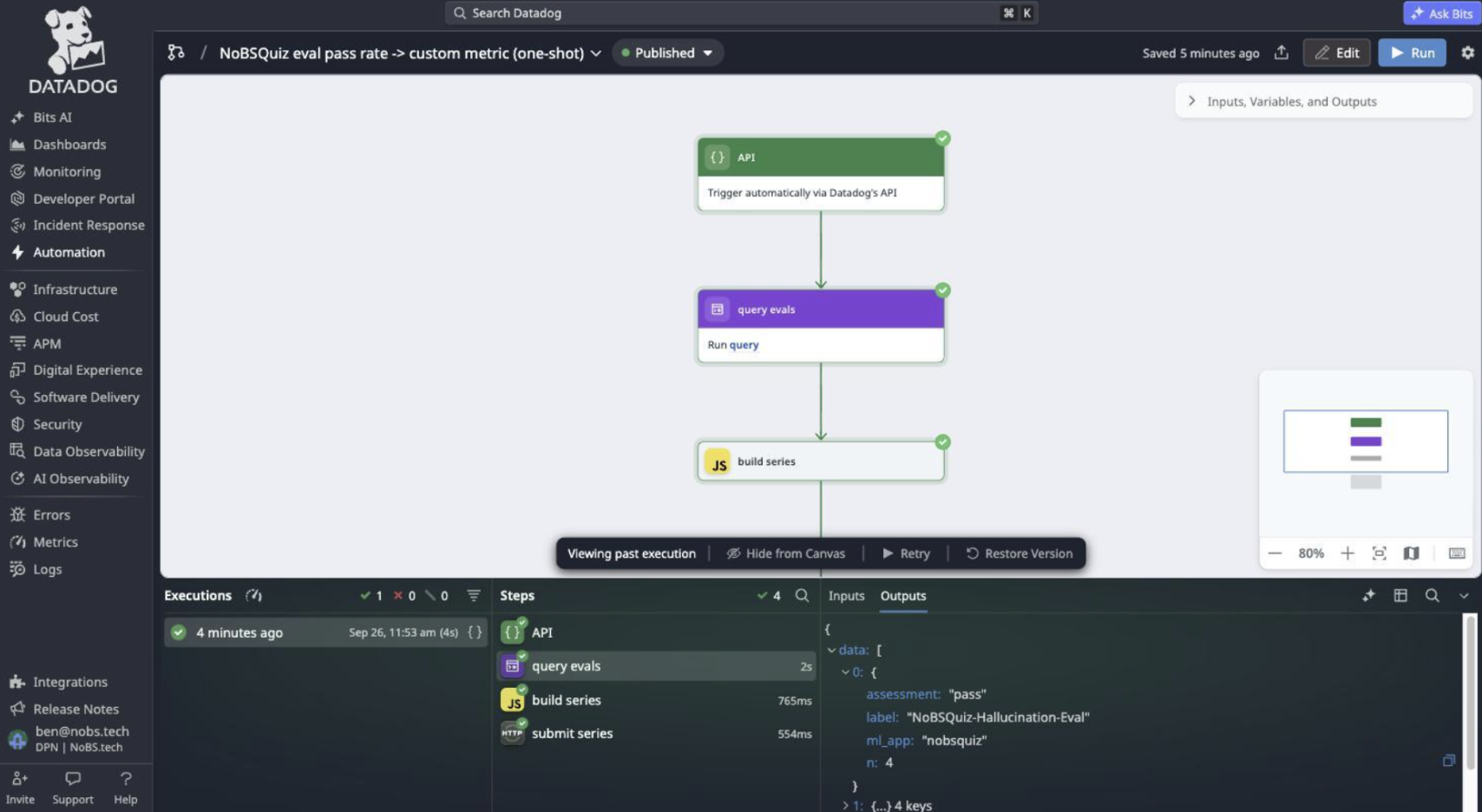
The one-shot workflow run against nobsquiz: three steps, with the real query output in the Outputs tab
Build the metric payload
Next comes the transform, a JavaScript function step (com.datadoghq.datatransformation.func) that turns those rows into a series payload. The action returns an array of row objects under data, while the DDSQL REST endpoint the docs describe comes back with columns holding arrays of values. A transform written against that documented shape produces an empty payload and no error. The submit step then happily accepts it (that one cost me a good chunk of time to resolve).
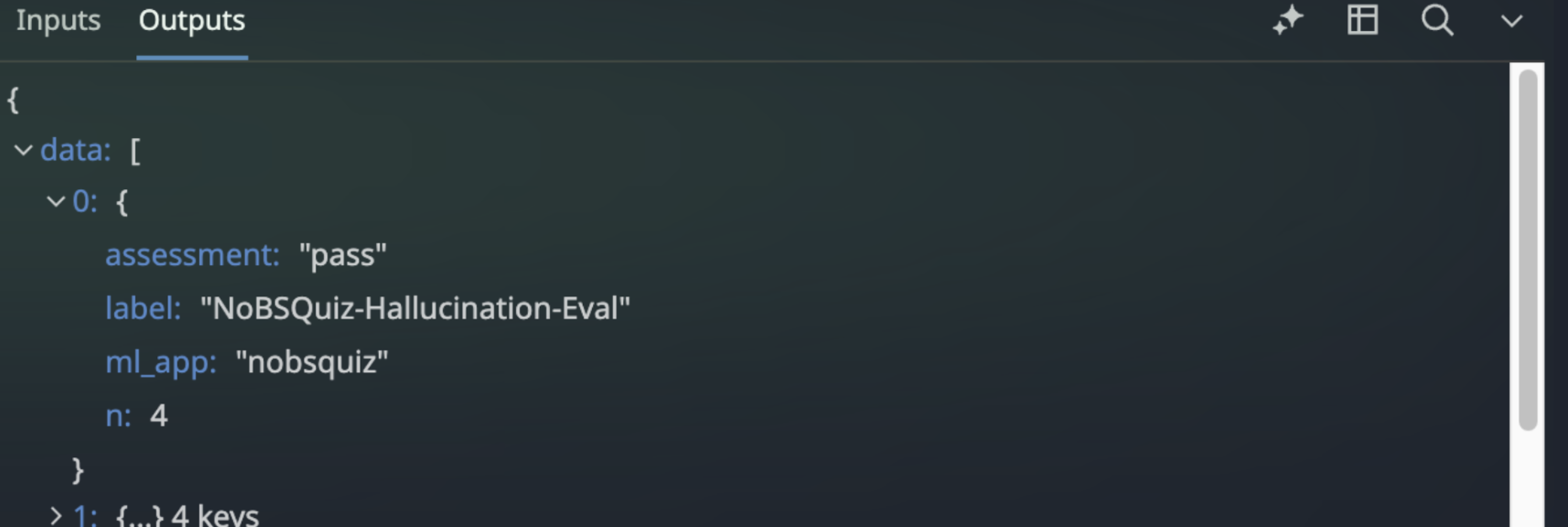
The query step's output: row objects carrying assessment, label, ml_app and n
Build one metric, agentobs.eval.result, with type: 1 for COUNT and an interval equal to your run cadence in seconds. Tag each series with ml_app, eval_name (the query's label column) and assessment. We want one metric name with an assessment tag, because the SLO's good and bad queries are then the same metric with one tag flipped. Those tags are also your only dimensions, and whatever you add to the GROUP BY is the cardinality you're signing up for.
Submit and monitor the metric
An HTTP request action then POSTs the payload to https://api.datadoghq.com/api/v2/series, or your own site's API host, using the same Datadog connection for auth. Give it a Content-Type of application/json and a body of {{ Steps.build_series.data.payload }}. Set the schedule trigger and make the query's time range equal to the cadence, because the two of them together define the denominator. A 15 minute range on a 5 minute schedule counts every evaluation three times. Every manual run while testing counts the current range again as well.
Matching the range to the cadence stops the overlap, but it doesn't line the windows up by itself. now() moves with every run, so a run that starts two minutes late leaves two minutes uncounted, and a judge can finish grading a span after that span's window was already queried. Anchor both bounds to the minute and end the range a few minutes behind now(). Even then this adapter has no replay in it, which is fine for a budget and worth knowing before anyone calls it exact.
Cadence is then a question of how fast you want to know. A point an hour is plenty for the budget. A burn rate alert pairs a long window in hours with a short window of minutes, though, and hourly points can't feed a 5 minute short window. If you want that alert, the adapter needs to run at that interval.
A run that fails leaves a gap in the total. The series endpoint won't take a point older than an hour unless Historical Metrics Ingestion is on for that metric, so decide up front whether you'll backfill or live with the gap. Either way the adapter needs its own monitoring, and Workflow Automation's own datadog.workflows.executions.started metric only tells you the schedule fired. Watch datadog.workflows.executions.completed for the workflow_id as well, emit explicit zeros when the query returns no rows, and put a no data alert on agentobs.eval.result itself.
Create and verify the SLO
From here the SLO is pretty straightforward. Create a metric SLO with good events as sum:agentobs.eval.result{ml_app:nobsquiz,eval_name:nobsquiz-hallucination-eval,assessment:pass}.as_count() and bad events as the same query with assessment:fail, then set the target and the time window. Filter on the app and the evaluation in both, or the first other evaluator you add starts sharing the budget. The SLO editor defines new SLOs as good and bad, and the older good over total form still works through the API. Use sum in both.
The editor accepted avg from me and computed an SLI of 180%. It will also accept a gauge as long as .as_count() is on the query, which is how I got a 100% SLI out of a severity gauge from another project that has never counted anything. Datadog checks that the modifier is there and takes your word on the metric type, so make sure the transform submits counts.
Then we check the metric against the tab it's supposed to mirror. Pick a range, compare sum:agentobs.eval.result{ml_app:nobsquiz,assessment:pass}.as_count() and the same query for fail to the Evaluations tab, and both counts should match exactly (4 and 25 in my case). Matching on the percentage alone isn't enough, since 4 of 29 and 40 of 290 look identical. If it reads zero, open the submit step's Inputs tab and look at the resolved body, because the intake returns success for an empty payload and "Payload is empty" is the only clue you get.
Validate the judge before trusting the budget
A metric that matches the tab is only half of it, though. The budget you end up with inherits every property of the judge that produced it. To test the rolling version of the workflow I ran a small local model over a fixed support document, answering questions and then grading its own answers for groundedness in a second call. The first judge inherited the answer call's sampling temperature of 0.7, and it failed a correct answer about a refund window with reasoning about SSO providers. The model had answered correctly, and the judge's reasoning was about a different question entirely.
I pinned the judge to temperature 0, tightened the rules and added two worked examples. The result agreed with me on six cases I labelled by hand, including one where the answer says 60 days and the document says 30. That's a sanity check on one small judge, and it's still the check to run before you put a target on any evaluation: label a handful of cases yourself and see whether the judge agrees.
The same adapter works for any signal that was never a metric but can be counted on a schedule. I've built it twice before, once to render monitor state into a severity gauge for an executive dashboard and once to turn a backup platform's GraphQL API into about 97 series per run. Both of those got their own monitor as well, since a missed run is a gap in the metric whether the source is a GraphQL API or a DDSQL query.
Common Implementation Questions
Why can't I use the Evaluations tab pass rate directly for an SLO?
The pass rate is calculated from retained evaluation results, not a durable count metric. For evaluations attached to production traces, retention is 15 days by default. This workflow publishes pass and fail counts as a metric that can support a longer-window SLO.
Do I need Workflow Automation if my evaluator runs in my own code?
No. You can emit counts through DogStatsD from your application, where you already call the SDK's submit_evaluation.
The workflow approach is for evaluations running inside Datadog, where you don't have your own evaluation code path to attach metric submission to.
Does the SLO measure every answer the agent gives?
Only evaluated answers. If your judge samples 10% of requests, the SLO measures outcomes for that sample, not all agent responses. Requests the judge never sees aren't included in the denominator.
How do I avoid counting evaluations more than once?
Match the query window to the workflow cadence and align the window boundaries. A 15-minute query on a 5-minute schedule counts the same evaluations repeatedly. Manual runs can also count results already submitted.
Account for late workflow executions and evaluations that finish after their original window. Matching intervals alone doesn't prevent gaps, and this adapter has no automatic replay.
How do I verify that the SLO is counting correctly?
Compare the pass and fail counts against the Evaluations tab for the same app, evaluation, and source time range. Check the counts, not just the percentage. For a one-time batch submission, compare against the source results used to create that batch.
Validate the judge against hand-labeled examples and monitor the workflow for missed runs. A metric that counts correctly isn't useful if the judge is unreliable or the workflow stops submitting data.
Need a hand getting Agent Observability working in Datadog? Talk to a NoBS engineer.